
- A guide for the person paying, not the person coding
- The three main tools, in plain terms
- The cost reality nobody puts on the pricing page
- The Nordic angle: where does your code go?
- At a glance (in dollars!)
- So what should a Nordic business do?
- How this connects to your wider setup
- Common questions
- Sources
- Keeping this up to date
A guide for the person paying, not the person coding
If you run a Nordic company and your developers are asking to expense an AI coding tool, you probably want to understand what you are approving without becoming an expert in it. That is who this guide is for. It is a plain orientation to the main options, what each one is, what it actually costs, and the questions that matter for a Nordic business, especially where your code goes.
We are not going to pretend to benchmark these tools on code quality. Developers have strong, well-informed opinions on that, and the honest advice is to let your team test on their own real projects. What we can do is map the landscape and cover the business and compliance side, which is our lane.
The quick orientation:
- GitHub Copilot: the incumbent, built into the editors developers already use. The safe default, and the one with the clearest EU data-residency option.
- Cursor: a full AI-first code editor. Popular with developers who want AI woven into everything.
- Claude Code: a terminal-based AI agent for more autonomous, complex tasks.
- Most teams combine them, rather than picking just one.
- The real cost is not the sticker price. Modern “agent” features bill by usage, so a $20 plan can become a $100 plan for heavy users. This is the thing to understand before you approve it.
The three main tools, in plain terms
AI Coding Assistants for Nordic Businesses:
GitHub Copilot

The most established option, from GitHub (owned by Microsoft), with millions of paying users and adoption across most large companies. It works as an add-on inside the code editors developers already use (VS Code, JetBrains and others), offering suggestions and chat as they type. For a team already on the Microsoft and GitHub stack, it is the path of least resistance.
For a Nordic business, its standout feature is compliance, covered in detail below: it has the clearest EU data-residency option of the three.
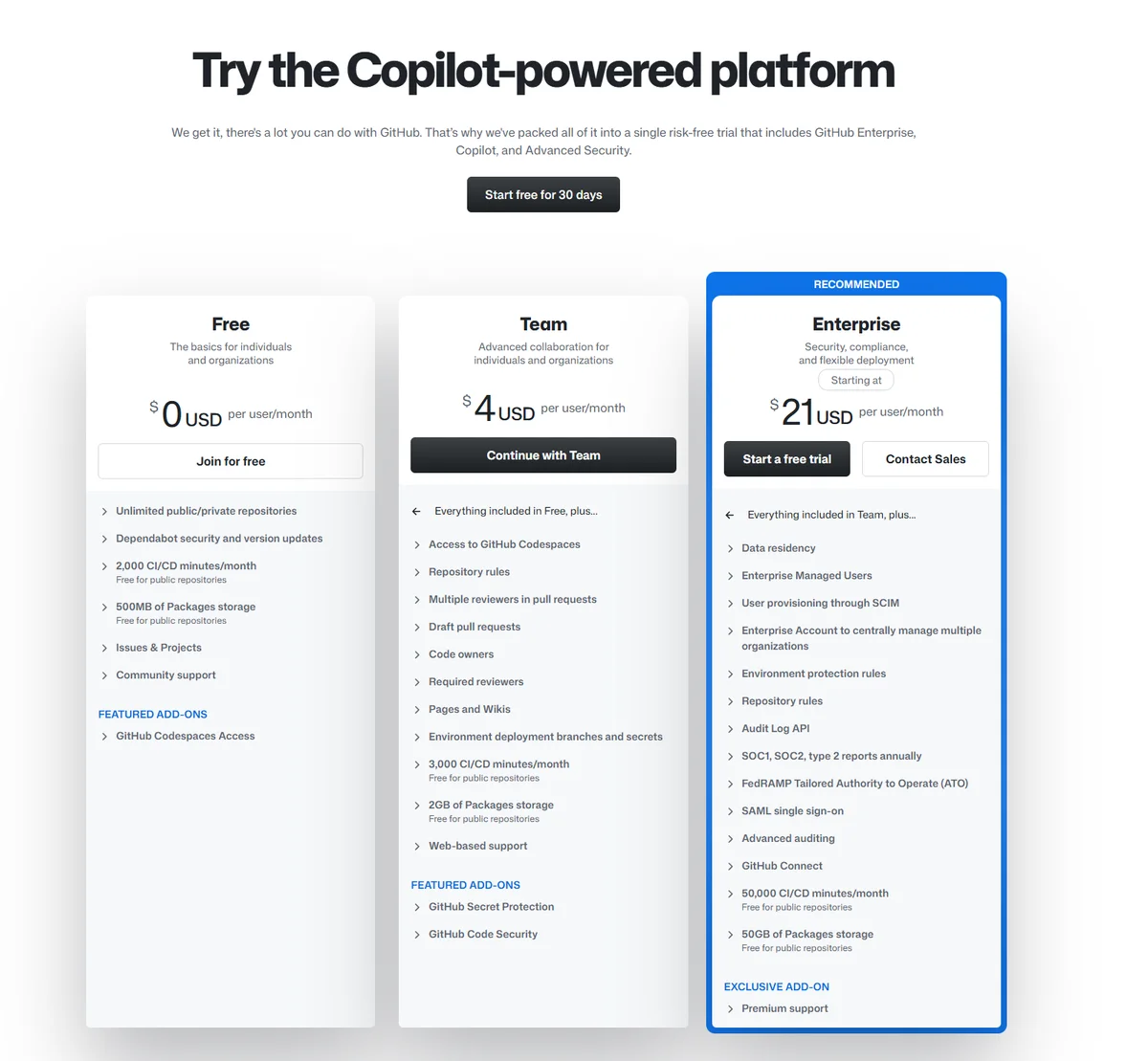
Pricing: Free tier, Team around $4/month, Enterprise 21/user/month, Enterprise around $39/user/month (plus a GitHub Enterprise seat). Note that since mid-2026 it uses usage-based billing for its heavier features, so costs can rise with use.
Cursor
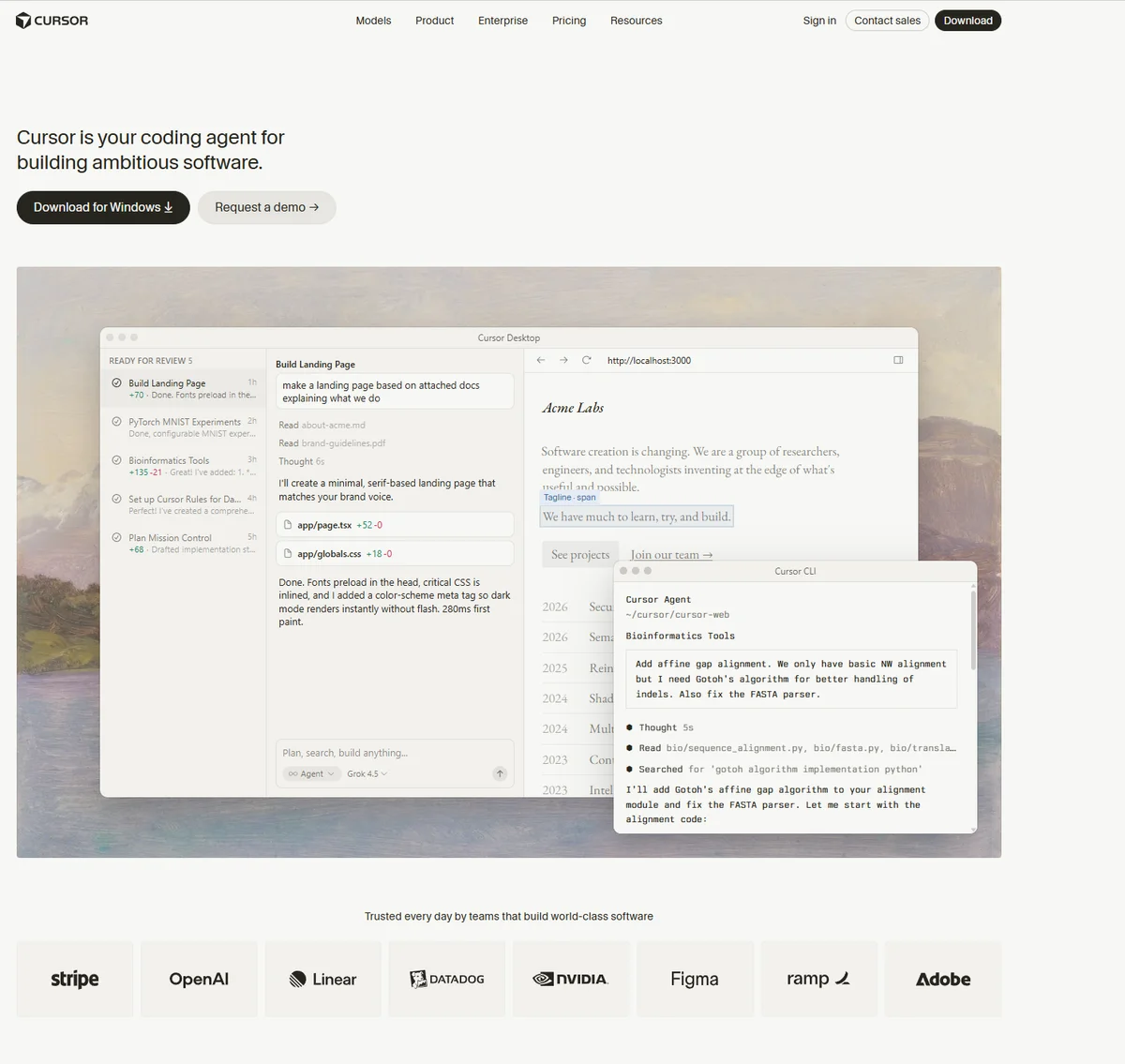
Cursor is a complete AI-first code editor (a redesigned version of the popular VS Code) with AI built into every part of the workflow, rather than bolted on. Developers who want a deeply AI-integrated editing experience tend to like it. It is standalone, so it replaces the editor rather than adding to one.
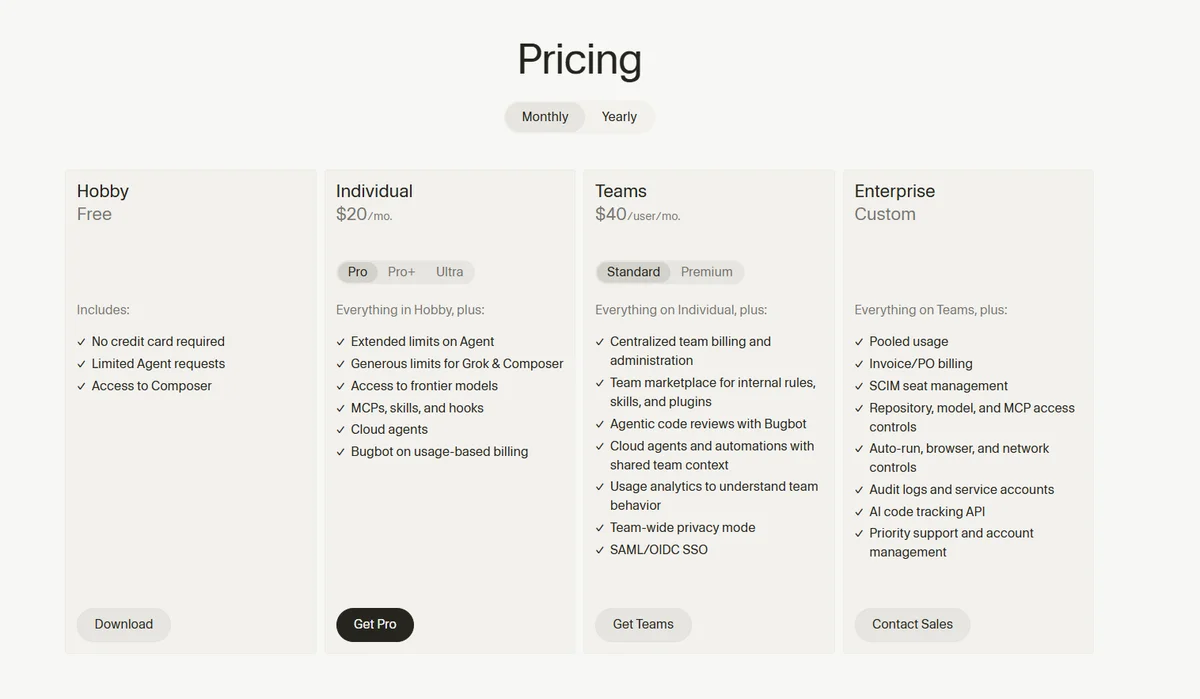
Pricing: Free option, Individual $20/month, but its own documentation notes that developers who use its “agent” features heavily typically land closer to $60 to $100/month. Teams $40 per user per month. Enterprise CUSTOM pricing.
Claude Code

Claude Code, from Anthropic, runs in the terminal as an autonomous agent rather than as an editor extension. You describe a task, and it works across your files, runs commands, and iterates until it is done. It is aimed at more complex, multi-step work rather than simple autocomplete. (It is a separate tool from the Claude chat assistant, though it uses the same account.)
Pricing: comes through Claude plans, Pro at 18€ roughly $20/month (limited use) or Max at 90€ roughly $100 and a bit more for a month for heavier use(agent use). For the comparison sake, I will keep the prices in the chart all in dollars, because Cursor and Github lacks the € price.


A note on our neutrality: Claude Code is made by Anthropic, which also makes the AI assistant behind some of this site’s own workflow. We cover it here from its documentation, the same as the others, and we do not rank these tools on code quality. Your developers should test and decide.
What “combining them” actually looks like
This surprises non-developers, but it is normal: many developers use more than one of these at once, because they do different jobs. A realistic day for a developer at a Nordic software company might look like this. They keep GitHub Copilot running inside their editor for the constant small stuff, autocompleting lines and finishing functions as they type, which is the fast, cheap, always-on layer. When they hit a bigger job, say “refactor this whole module and update all the tests,” they hand it to Claude Code in the terminal and let it work through the multiple files on its own while they do something else. A developer who prefers a fully AI-built editor might use Cursor as their main workspace instead of the standard editor, with Copilot’s role folded into it.
So “which one should we buy” is sometimes the wrong question. A common setup is one always-on assistant for daily typing plus one agent for heavy tasks. For a decision-maker, the practical implication is that your developers may reasonably ask for two subscriptions, and that can still be cheaper than the hours saved, as long as you keep an eye on the usage costs below.
The cost reality nobody puts on the pricing page
This is the single most useful thing for a decision-maker to understand, because it is where budgets get a surprise.
The headline monthly price is no longer the full cost. All three tools now have “agent” modes, features that autonomously work through larger tasks, and those are billed by usage (tokens or credits) on top of the base plan. Simple autocomplete stays cheap. But long agent sessions, big refactors, and automated test-fixing can push the real bill far past the sticker price.
How far? Industry analysts have noted that a large share of organisations spend $200 to $500 per developer per month on AI coding usage alone, well above the advertised plan prices. So when you approve “a $20 tool,” understand that heavy use of the modern features can multiply that. The practical move: set usage limits or pick a plan with a firmer spending ceiling (Claude Code’s fixed Max tiers, for example, cap spend more predictably than pure usage-based billing).
The Nordic angle: where does your code go?
Here is the question a Nordic business should actually ask, and the one developers may not think about: when your team uses these tools, your proprietary source code is sent to the tool’s servers. For a company with sensitive code or strict data governance, where that processing happens matters.
The verified state of play:
GitHub Copilot has the clearest EU option. Its Business and Enterprise tiers do not use your code to train the underlying models, and Enterprise customers can enable EU data residency, which keeps all inference processing and data within the EU region. Importantly, this aligns with Microsoft’s EU Data Boundary, which covers EU member states plus the EFTA countries, and that explicitly includes Norway and Iceland. So for a Norwegian or Icelandic company, Copilot Enterprise offers a genuinely clear “your code stays in the EU/EEA” path. This is the strongest compliance story of the three. One honest cost note: enabling data residency adds roughly a 10% premium on request costs, since regional endpoints cost the provider more, so the compliance option is not free, but it is clearly available.
Two more things a Nordic GDPR check will want to know about GitHub. First, for European users the data controller is GitHub B.V., based in Amsterdam, not the US parent company. That means an EU entity is the legally responsible party for your data, which is a genuine plus. For international transfers, GitHub relies on the standard mechanisms (Standard Contractual Clauses and EU-US Data Privacy Framework certification). Second, the honest caveat: GitHub’s privacy terms list “legitimate interests” as a basis that includes developing its AI and machine-learning technologies, meaning platform data can in principle feed AI training. The Business and Enterprise tiers plus a signed Data Processing Agreement are how you close that off, so for sensitive code, the enterprise tier and DPA are the setup to insist on.
Claude Code does not train on your code via its API usage, which is a real privacy point, though you should confirm the current data-processing and region terms for your governance needs.
Cursor offers a privacy mode on its Business plan that does not store your code, again worth confirming against your specific requirements.
For maximum control, the only way to keep code entirely on your own machines is a self-hosted setup with local models, which is more effort but the strongest sovereignty option, and one the Finnish developer community in particular tends to appreciate.
The practical takeaway: if data governance is a hard requirement, the compliance tier and data-residency terms matter more than which tool writes marginally better code. Copilot Enterprise currently has the most clearly documented EU path.
At a glance (in dollars!)
| Tool | What it is | Base price | EU data residency | Best for |
|---|---|---|---|---|
| GitHub Copilot | Editor add-on | Free / ~$4 Team / ~$21 Enterprise | Yes, Enterprise (EU Data Boundary, incl. Norway/Iceland) | Teams on Microsoft/GitHub, compliance |
| Cursor | AI-first editor | ~$20 (more with agents), Teams $40 per user, Enterprise custom | Privacy mode (Business) | Developers wanting deep AI integration |
| Claude Code | Terminal agent | Pro~$20 / Max ~$100 / Team Standard ~$20 Premium seat ~100 / Enterprise custom | No training on code; | Complex, autonomous multi-file tasks |
Prices are approximate and change often; heavy “agent” use adds usage costs on top. Confirm current data-residency and processing terms with each vendor before relying on them for sensitive code. Assessed from documentation (🔵), not hands-on code benchmarking.
So what should a Nordic business do?
- Want the safest, most compliance-friendly default? GitHub Copilot, and Enterprise if EU data residency is a hard requirement (the clearest EU/EEA path, covering Norway and Iceland).
- Your developers want the best editing experience and you trust their judgement? Let them trial Cursor and Claude Code on real work, they often combine tools anyway.
- Sensitive proprietary code and strict governance? Prioritise the compliance tier and data-residency terms over marginal code-quality differences, or consider a self-hosted local setup.
- Whatever you pick, set a usage budget. The base price is not the ceiling once agent features are in play.
How this connects to your wider setup
Where your code goes is the same question as where the rest of your business data goes. Our EU data residency guide covers the same sovereignty question across AI tools generally, and our EU AI Act guide covers the compliance backdrop.
Common questions
Which AI coding tool is best for a Nordic company? For compliance and ease, GitHub Copilot is the safe default, and its Enterprise tier has the clearest EU data-residency option (covering Norway and Iceland via the EU Data Boundary). For code quality, let your developers test, since that is a matter of informed preference.
Do these tools send my code to the US? By default, code is processed on the tool’s servers. GitHub Copilot Enterprise offers EU data residency; Cursor and Claude Code have privacy and no-training terms to confirm. For full control, a self-hosted local setup keeps code on your machines.
Why is the real cost higher than the advertised price? Because modern “agent” features bill by usage on top of the base plan. Simple autocomplete stays cheap, but heavy autonomous tasks can multiply the bill. Set usage limits.
Do I have to pick just one? No. Most developers combine tools, for example an editor assistant for daily work plus a terminal agent for complex tasks.
Is my code used to train the AI? On business and enterprise tiers, generally no (Copilot Business/Enterprise and Claude Code’s API usage do not train on your code). Free and consumer tiers may differ, so check the terms before using sensitive code.
Sources
Verified 12th of August 2026. The EU data-residency facts are confirmed from GitHub’s own primary documentation; pricing is from current reporting and changes frequently, so confirm before relying on it.
- Copilot EU data residency, EU Data Boundary covering Norway and Iceland, and the 10% cost premium (primary source, GitHub’s official changelog): github.blog/changelog/2026-04-13-copilot-data-residency-in-us-eu-and-fedramp-compliance-now-available
- Microsoft EU Data Boundary scope (EU member states plus EFTA: Iceland, Liechtenstein, Norway, Switzerland): learn.microsoft.com/en-us/privacy/eudb/eu-data-boundary-learn
- Copilot Business/Enterprise do not train on your code; EU residency configurable: GitHub Copilot documentation and privacy terms, docs.github.com/copilot
- GitHub B.V. (Amsterdam) as EU data controller, SCCs and Data Privacy Framework certification, and the AI-training legitimate-interests basis: GitHub General Privacy Statement, docs.github.com/site-policy/privacy-policies/github-general-privacy-statement
- Current pricing for Copilot, Cursor and Claude Code taken from the websites, cursor.com, github.com and claude.ai.
- The “real cost exceeds sticker price,” usage-based agent billing, and org spend figures: daily.dev/blog/ai-coding-tools-cost-cursor-vs-copilot-vs-claude-code-pricing
Keeping this up to date
AI coding tools change pricing, billing models and features very frequently. We verify from current documentation and date this. Last reviewed 12th of August 2026. If something has changed, tell us.
Published by NordicAITools Marko Keipi. This is an orientation guide assessed from vendor documentation (🔵), not a hands-on code-quality benchmark. We do not rank these tools on coding performance; your developers should test on real projects. In line with our published methodology.
