
- The short version on The Best AI Translation for Nordic Languages
- Why Nordic languages are a real test
- DeepL: the trusted document translator
- The AI assistants (Claude and ChatGPT): the naturalness winners
- Google Translate: fast, free, everywhere
- At a glance
- So which should you use?
- A note on data and privacy
- Common questions
- Keeping this up to date
The short version on The Best AI Translation for Nordic Languages
If you translate to or from Finnish, Swedish, Norwegian or Danish, the honest 2026 answer is that there is no single winner anymore, and the old advice (“just use DeepL”) is now incomplete.
Here is how it actually breaks down:
- DeepL is still excellent, especially for documents and formal business text, and it stays the trusted default in many Nordic offices. But it has real gaps worth knowing (more below).
- The AI assistants (Claude, ChatGPT) have genuinely caught up, and for natural, conversational Nordic text they now often read more human than the dedicated translators. In our own use, Claude produces the most natural Nordic-language output.
- Google Translate is fast, free and everywhere, and fine for getting the gist, but it is the most likely to sound robotic in Nordic languages.
The right tool depends on whether you want a faithful document translation (DeepL) or natural-sounding text a native would actually write (an AI assistant). This article walks through each, and flags the Nordic-specific traps.
Why Nordic languages are a real test
Nordic languages are genuinely hard for translation engines, and that difficulty is exactly where the differences show up.
Finnish has 15 cases and builds long compound words, so a tool can be grammatically correct yet still sound unmistakably machine-made. Swedish and Danish have their own compound-word and phrasing conventions that are easy to get subtly wrong. And Norwegian has a wrinkle most tools ignore entirely: it has two written standards, Bokmål and Nynorsk, and as you will see, not every tool handles both.
So “does it support Nordic languages” is the wrong question. Almost all of them technically do. The real question is whether the output sounds like a native wrote it, or like a foreigner translated it word by word.
DeepL: the trusted document translator
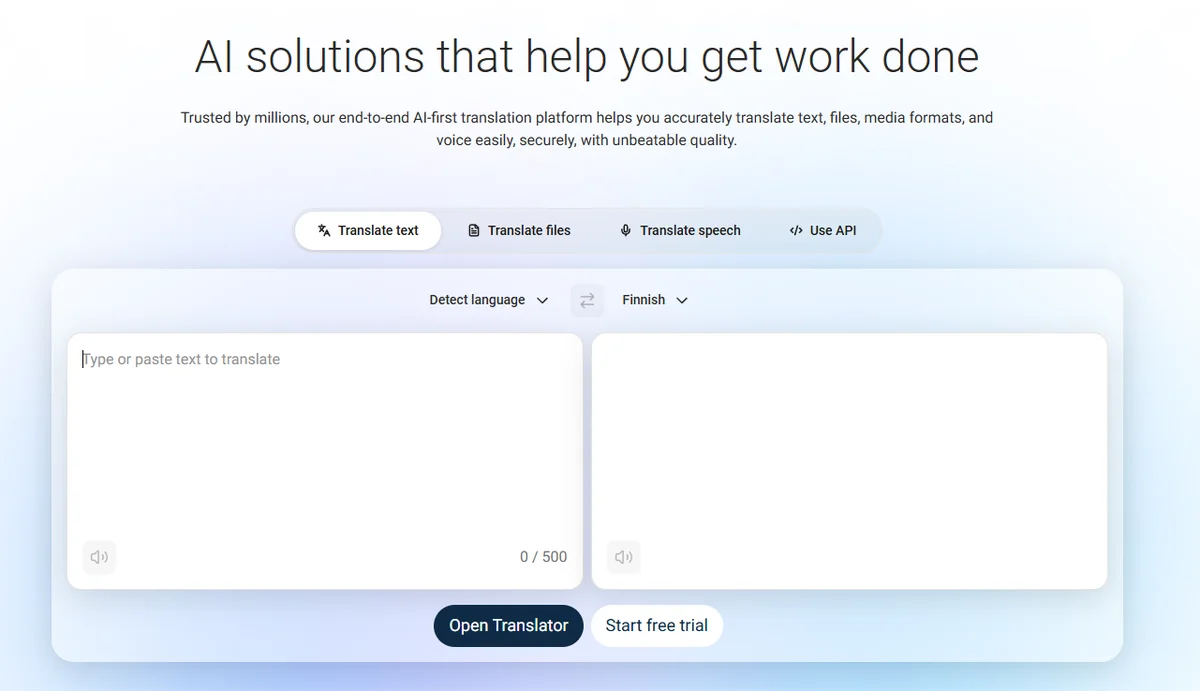
🟢From documentation and general use.
DeepL, the German-built translation specialist, has long been the Nordic office favourite, and for good reason. It supports all four main Nordic languages (Finnish and Swedish since 2021, Danish, and Norwegian Bokmål since early 2023), and professional translators consistently rate its European-language output as more natural than Google Translate, especially for longer and more formal text.
Where DeepL genuinely shines is document translation: drop in a Word file or PDF and it preserves the formatting while producing a faithful, business-appropriate translation. For contracts, reports and formal Swedish or Danish business text, it remains a strong, reliable choice. It also offers glossaries to keep terminology consistent, which matters for company-specific vocabulary.
The Nordic gaps worth knowing:
- Norwegian: Bokmål only. DeepL does not handle Nynorsk. If your audience uses Nynorsk, this is a real limitation.
- No Icelandic. Not supported.
- The quality edge is narrower for smaller languages. DeepL’s biggest advantage is in the large European pairs (German, French, Spanish). For Finnish specifically, the gap over the AI assistants has narrowed a lot.
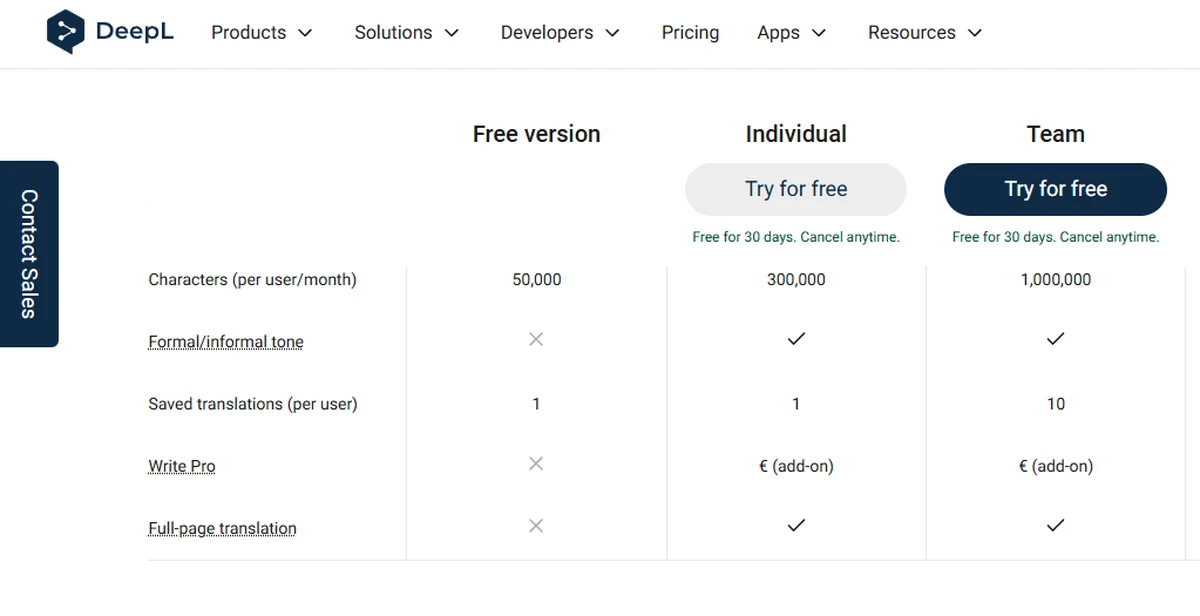
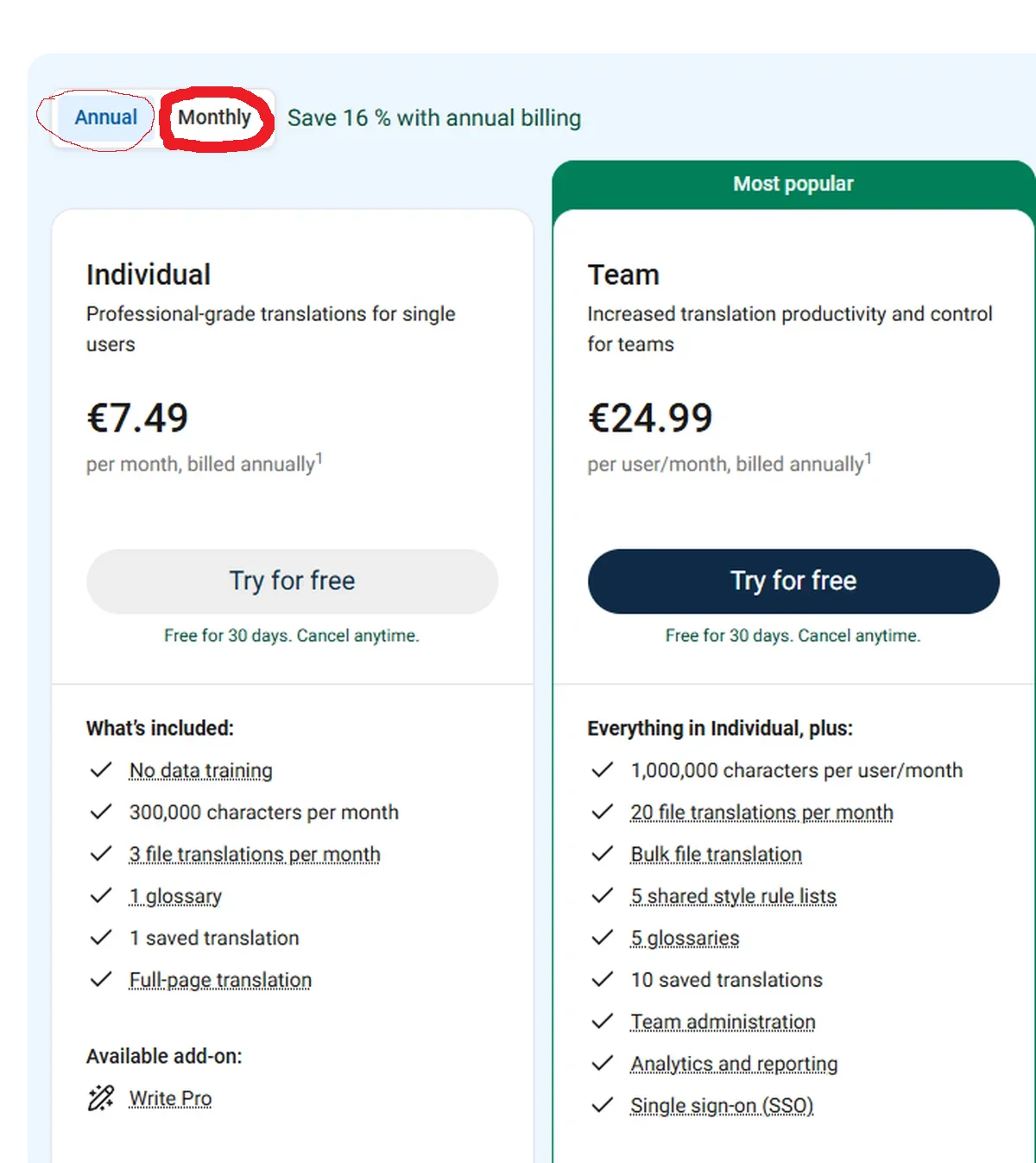
Pricing: There’s a free version available for 50,000 Characters per month. You also have free trial for 30 days for the Individual and Team levels, Individual costs €8.99/month (unlimited text), Advanced around €29.99/month for heavier document work. Best for: formal document translation, Swedish and Danish business text, teams wanting consistent terminology. Verdict: 🟢 Still excellent for documents; check the Bokmål-only limit for Norwegian.
FREE PLAN or TRIALS:
Paid by monthly PRICE:
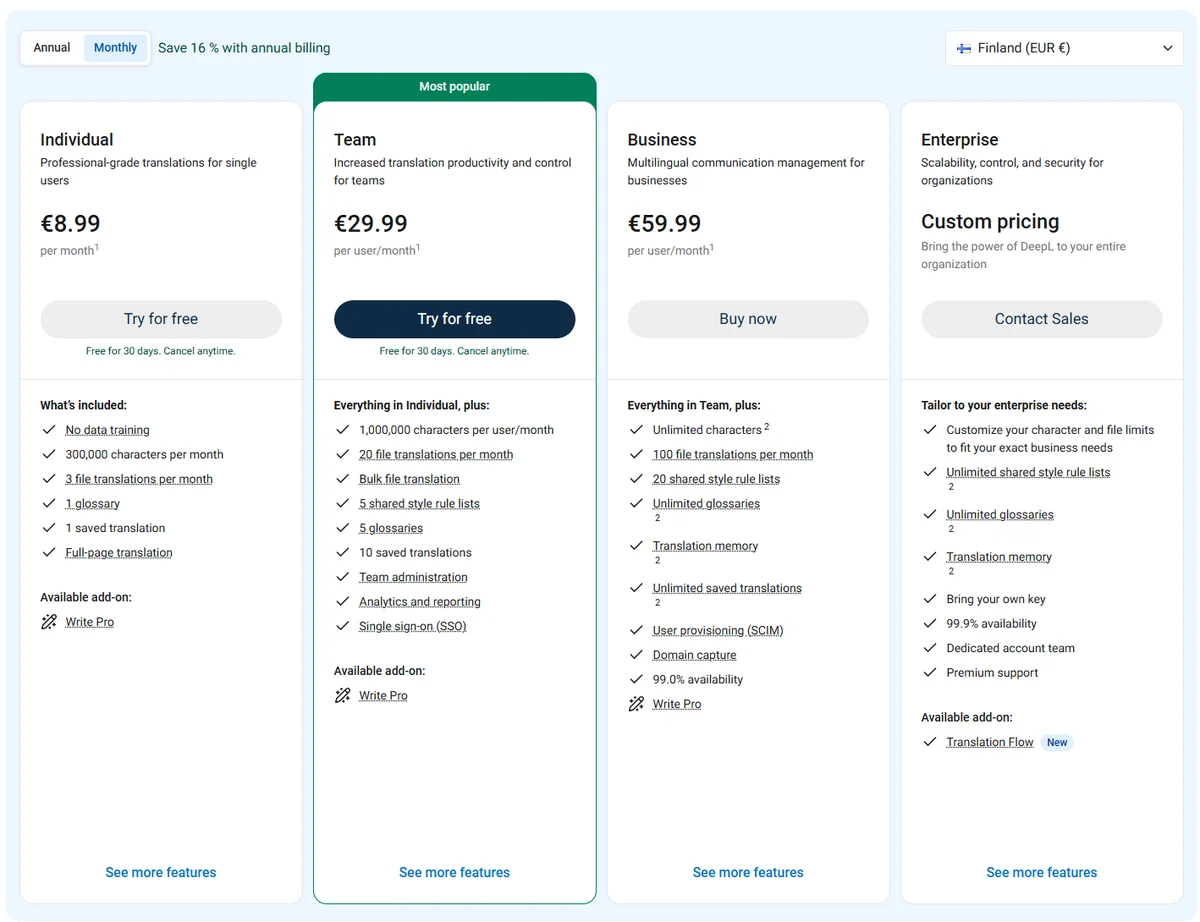
A small warning: when I decided to sign up with DeepL and purchased it, I paid for the Annual price, because it’s activated Annual(so for the whole year), which is a bit hidden.. So just make sure you click the monthly price and then click the buy now, before purchase. I didn’t mind buying for the year, because I knew I would use it, but saves you the trouble cancelling later, if you notice you are paying for the yearly price.
The AI assistants (Claude and ChatGPT): the naturalness winners
🟢 Hands-on, from our own daily use.
This is where 2026 differs from a couple of years ago. The general AI assistants have become genuinely excellent translators, and for natural-sounding Nordic text they often beat the dedicated tools.
In our own daily use across all three major assistants, Claude produces the most natural Nordic-language output, the least “translated” feeling, with ChatGPT more capable but occasionally more robotic, and Gemini solid in between. (We go deeper on this in our ChatGPT vs Claude vs Gemini comparison.)
The reason the assistants win on naturalness is that you can talk to them. You can say “translate this into Finnish, but make it sound casual and friendly, like a native would write to a colleague,” and adjust the tone, register and phrasing in a way a one-shot translator cannot. For marketing copy, social posts, emails and anything where sounding human matters, this control is a real advantage.
Where they are weaker: they do not preserve document formatting the way DeepL does, they can occasionally take liberties with meaning, and for a large legal document you want faithfulness over flair. So they are the naturalness tool, not always the fidelity tool.
Best for: marketing copy, emails, social content, casual and conversational Nordic text, anything where tone matters. Verdict: 🟢 The most natural-sounding option, especially Claude, and the most flexible.
Google Translate: fast, free, everywhere
🟢 From general use.
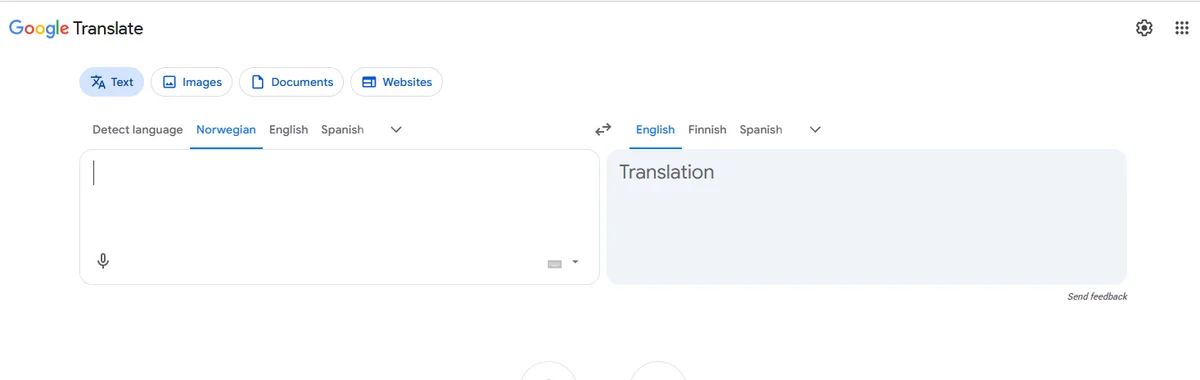
Google Translate is the one everyone has used. It is instant, free, built into browsers and phones, and supports every Nordic language including Nynorsk and Icelandic (broader raw coverage than DeepL). For understanding the gist of a Finnish email or a Norwegian web page, it is perfectly good and always to hand.
Its weakness is exactly the one this article cares about: naturalness. For Nordic languages it is the most likely of the three to produce text that reads correctly but sounds robotic, so it is a poor choice for anything you will publish or send to a customer. Use it to understand, not to produce.
Best for: quick gist translation, understanding foreign text, widest language coverage (including Nynorsk and Icelandic), zero cost. Verdict: 🟢 Great for understanding, weakest for polished output.
At a glance
| Tool | Best at | Nordic-language feel | Document formatting | Cost |
|---|---|---|---|---|
| DeepL | Faithful document translation | Strong (formal) | Excellent | Free tier / from 8.99/mo |
| Claude / ChatGPT | Natural, tone-controlled text | Most natural (Claude) | Weak | Free tiers / from ~€22/mo |
| Google Translate | Fast gist translation | Most robotic | Basic | Free |
Language coverage note: Google Translate covers Norwegian Nynorsk and Icelandic; DeepL does not (Bokmål only, no Icelandic).
So which should you use?
- Translating a formal document, contract or report (especially Swedish or Danish)? DeepL. Faithful, formatting preserved, business-appropriate.
- Writing marketing copy, an email or social post that must sound native? An AI assistant, Claude for the most natural Nordic output. You can tune the tone.
- Just need to understand a foreign text quickly? Google Translate. Free and instant.
- Working in Norwegian Nynorsk or Icelandic? Not DeepL. Use Google Translate or an AI assistant.
- Best real-world setup: use DeepL for documents and an AI assistant for anything that needs a human voice. Many Nordic professionals already run both.
One honest tip whichever you choose: always have a native speaker check anything important. These tools are good enough to draft, not yet good enough to publish Nordic-language text unchecked. The closer the text is to your brand or your customers, the more that final human read matters.
A note on data and privacy
If you are translating business documents that contain personal data, remember that you are sending that text to a third-party service. Where it is processed matters for GDPR. DeepL emphasises data security and EU processing for business plans; the AI assistants vary by plan. We cover where the major tools store data in our EU data residency guide, which is worth a look before you paste anything sensitive into any translator.
Common questions
What is the best AI translator for Finnish? For natural-sounding Finnish, an AI assistant (Claude in our experience) tends to read most native. For faithful document translation, DeepL. Google Translate is fine for understanding but the most robotic for output.
Is DeepL better than Google Translate? For polished, natural European-language output, generally yes, especially for documents. Google Translate wins on speed, cost, and raw language coverage (including Nynorsk and Icelandic, which DeepL lacks).
Can ChatGPT or Claude translate as well as DeepL? For natural, tone-controlled text, often better, because you can direct the style. For faithful document translation with preserved formatting, DeepL still leads.
Does DeepL support Norwegian Nynorsk? No. DeepL supports Norwegian Bokmål only. For Nynorsk, use Google Translate or an AI assistant.
Should I trust AI translation for business without checking? No. Use it to draft, but have a native speaker review anything customer-facing or important. The tools are strong but not flawless in Nordic languages.
Keeping this up to date
Translation tools improve fast, and language support and pricing change. We date this and revisit it. Last reviewed 8th of July 2026. If something has changed, tell us.
Published by NordicAITools Editorial. The naturalness comparison reflects our own hands-on use of the AI assistants (🟢); tool coverage and pricing are verified from current documentation (🔵), in line with our published methodology.
Sources
Tool language coverage, pricing and capability claims are verified from official documentation and current reporting (verified [DATE]). Naturalness comparisons reflect our own hands-on use. Confirm current pricing before subscribing, as it changes often.
- DeepL supported languages (all four Nordic languages; Norwegian Bokmål only, no Nynorsk or Icelandic): DeepL Help Center, support.deepl.com/hc/en-us/articles/360019925219
- When Nordic languages were added (Finnish and Swedish 2021, Norwegian Bokmål early 2023): DeepL Translator, Wikipedia, en.wikipedia.org/wiki/DeepL_Translator
- DeepL’s quality edge concentrated in large European pairs, narrower for smaller languages: SimpleLocalize AI translation comparison 2026, simplelocalize.io/blog/posts/ai-machine-translation-cost-comparison
- DeepL company background (German-built, founded 2017): DeepL Translator, Wikipedia, en.wikipedia.org/wiki/DeepL_Translator
- Google Translate Nordic coverage including Nynorsk and Icelandic: translate.google.com (language list)
Links to programs:
DeepL: https://www.deepl.com/en/translator
Google Translate: https://translate.google.fi/?sl=no&tl=en&op=translate
Claude: Claude.AI
ChatGPT: https://chatgpt.com/
