Last Updated: May 2026
Affiliate disclosure: NordicAITools may earn a commission from some links in this article. This never affects our recommendations. We test every tool ourselves.
- What Is Recraft AI?
- The Interface: Infinite Canvas Done Right
- Multi-Model Hub: Test Everything in One Place
- Our Test: We Got a Real Logo in Minutes
- How It Feels Compared to Midjourney
- The Pricing Problem: Read the Fine Print
- Strengths
- Weaknesses
- Can You Use Recraft at Work in the Nordics?
- Who Should Use Recraft?
Recraft AI Review:
Recraft AI is an AI image generation platform that does something most competitors do not it generates native vector graphics (SVG) directly from text prompts. That alone makes it interesting for designers, marketers, and brand teams. But there is more to the story, both good and bad.
We tested Recraft hands-on, including generating logos, testing the canvas workflow, and trying the upscaling features. Here is what we found.
What Is Recraft AI?
Recraft is a design-first AI image platform founded in 2022.
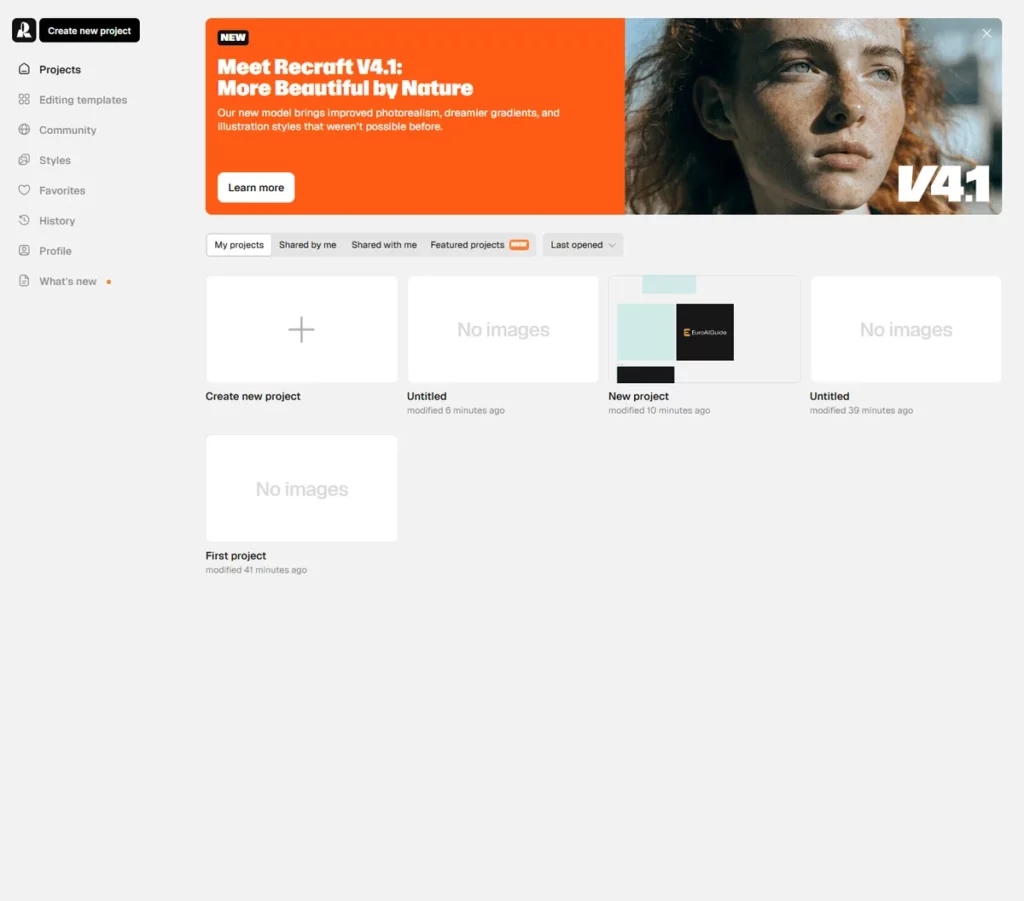
Their latest model is Recraft V4.1, which promises improved photorealism, better gradients, and new illustration styles.
What makes Recraft different from Midjourney or DALL-E is the focus. Those tools are great for generating standalone images, creative pictures. Recraft is built for designers who need assets they can actually use: logos, icons, illustrations, mockups in formats they can edit afterwards.
The Interface: Infinite Canvas Done Right
When you open Recraft, you get a infinite canvas instead of a typical image gallery.
This is a smart design choice. Your generations live as moveable objects that you can arrange, scale, and compare side by side.
We created a new project and at first felt a bit confused, but the workspace is clean, the tools are where you expect them, and there is no clutter. If you have used Figma or Miro before, you already know how this works.
The generation bar sits at the bottom. From here you can switch between different output types — images, videos, mockups, and image sets. You can also switch between control modes: Agents, Manual, and Exploration.
Multi-Model Hub: Test Everything in One Place
Here is something most people miss about Recraft: it is not just their own models.
Through the interface, you can access Recraft V1, V2, V4.1 and also third-party models including GPT Image, Ideogram, Nano Banana, and Midjourney via API integrations. You can switch between them without leaving the platform.
This is genuinely useful. Instead of having separate accounts for Midjourney, Ideogram, and Recraft, you can test the same prompt across multiple models from one canvas. For anyone doing design comparisons or client work, this saves real time.
Our Test: We Got a Real Logo in Minutes
The first thing we did with Recraft was generate a logo for our own website, NordicAITools. Within minutes, we had six different concepts on the canvas and one of them became the actual logo you see on this site (nordicaitools.com). That was genuinely impressive. From opening the tool to having a usable logo was faster than briefing a freelance designer.
To test it further, we ran a second experiment: generating a logo for a fictional law firm called “Marko & Friends Lawyering Up” black background, white text, elegant high-value brand feel.
First generation: Two concepts appeared within seconds. Clean typography, appropriate law firm styling.
Refinement: We adjusted the prompt spelling and generated more variations. The workflow felt natural — you refine on the same canvas instead of starting over each time.
Post-processing: We picked the best option, resized it to 2400×2400 pixels directly on the canvas, then right-clicked and selected “Omni upscale” to enhance the resolution. The right-click menu also includes Remove background, Vectorize, Modify region, and Convert to mockup — turning Recraft from an image generator into a proper design toolkit.
How It Feels Compared to Midjourney
This is worth addressing because most people considering Recraft have probably used Midjourney.
The honest comparison: Midjourney feels more like a toy. That is not an insult it is brilliant at what it does, which is generating artistic, visually stunning images. If you want beautiful concept art or creative illustrations, Midjourney is hard to beat.
Recraft feels like a professional tool. The infinite canvas layout was something we had never seen in an AI image generator before. It felt slightly more complicated than Midjourney at first, but it became natural within minutes. The ability to see all your variations at once, move them around, compare side by side that is how designers actually work.
Where Recraft really pulls ahead for business use is consistency. You can create a style template and apply it across all your posts, social media assets, and brand materials. Everything looks like it belongs together. Midjourney gives you beautiful one-off images. Recraft gives you a visual system.
If you are making art for fun, or not real world, use Midjourney. If you are building a brand or producing business assets, Recraft is worth the learning curve.
The Pricing Problem: Read the Fine Print
Now for the part that frustrated us.
Recraft’s pricing page defaults to showing you the annual price displayed as a monthly rate. The actual monthly billing option exists, but it is smaller, less highlighted, and easy to miss. We nearly paid for a full year when we only wanted to test the tool for a month.
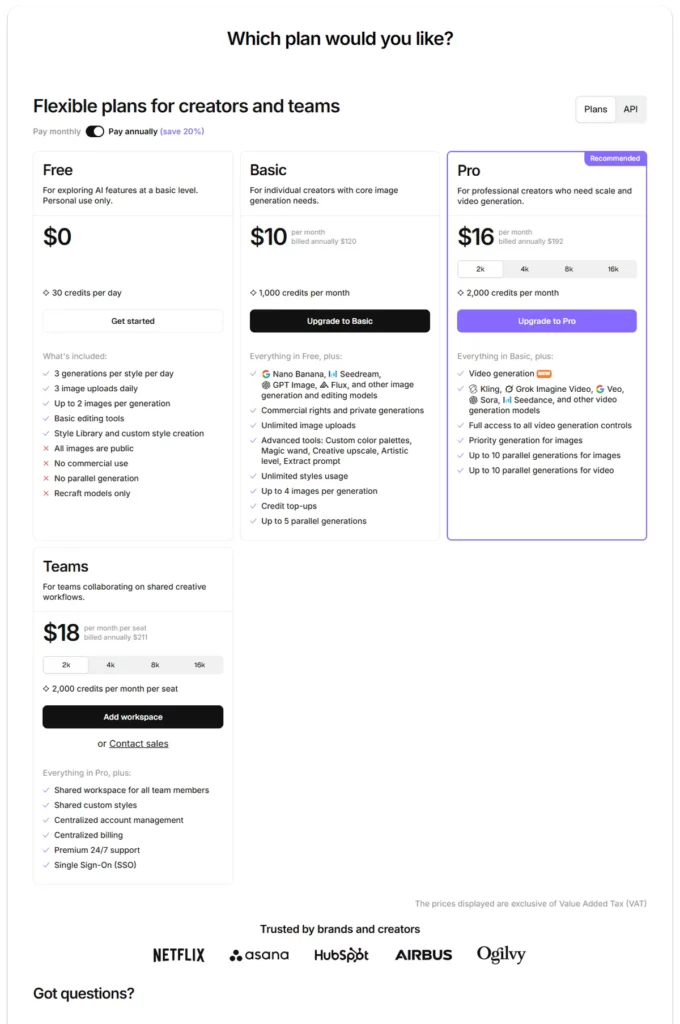
This is not unique to Recraft — a lot of SaaS companies do it now. But that does not make it okay. If you show “€10/month” in big text and the actual charge is €120 billed annually, you are being misleading. We ended up going back and choosing the Basic plan for actual monthly billing instead of the Pro annual plan we almost committed to.
Our advice: Always check the billing toggle before clicking “Subscribe.” Look for the small text that says “billed annually” or “billed monthly.”
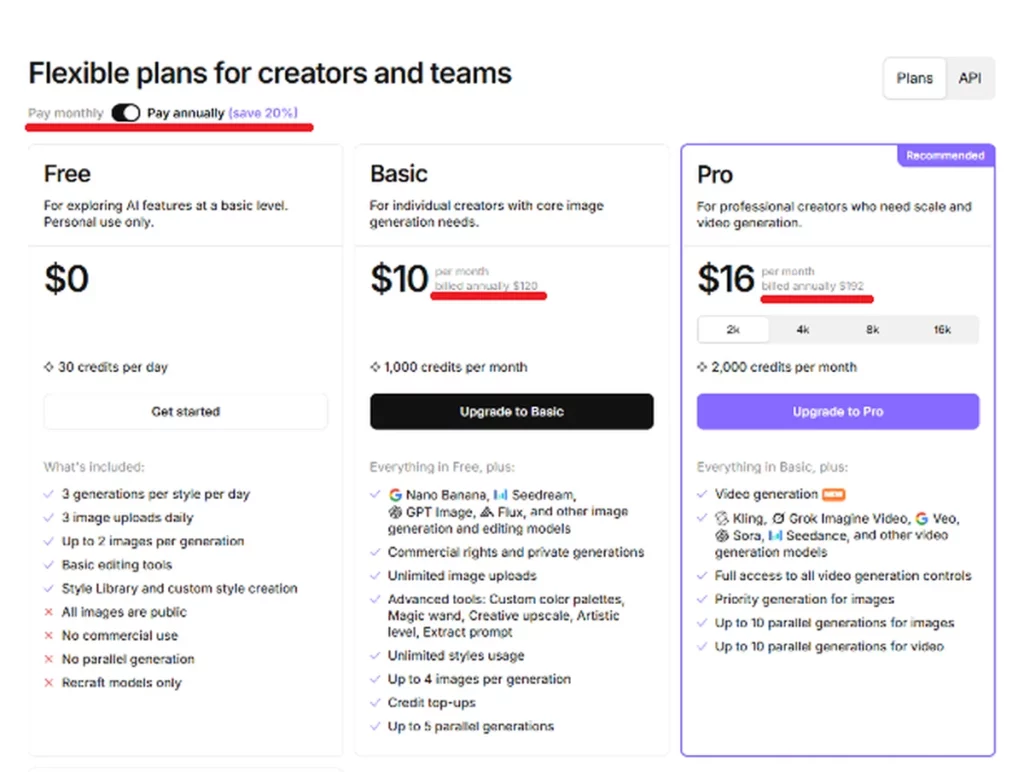
Here are the plans as of May 2026:
Free — 30–50 credits per day. Images are public, no commercial use, Recraft owns them. Fine for testing, not for client work.
Basic — Around 8,6€ – $10/month. 1,000 credits. Images are private and yours.
Pro — Around 21,49€ – $25/month. More credits, vector SVG export, full commercial rights. This is the minimum for professional use.
Team — Around 25,79€ – $30/user/month. Collaboration features. Sales contact required.
The critical thing to know: On the Free plan, Recraft owns your images and they are public. They can appear in the community gallery. On paid plans, your images are private and the commercial rights are yours. This is a real difference, not just a feature gate.
Strengths
Native vector generation — Recraft generates true SVG files. No other major AI platform does this. For logos, icons, and brand assets, this is a game-changer because vectors scale to any size without pixelation.
Infinite canvas workflow — Infite workspace makes iterative design natural. You see all your variations at once instead of scrolling through a gallery.
Multi-model access — Testing GPT Image, Midjourney, and Ideogram from the same interface saves time and lets you compare directly.
In-canvas editing — Upscaling, background removal, vectorization, and mockup conversion are all built in. You do not need to export and import between tools.
Style consistency — Recraft is designed for brand work where every asset needs to look like it belongs together.
Weaknesses
Annual pricing displayed as monthly — This is a dark pattern. It erodes trust, especially with Nordic buyers who value transparency.
Free plan ownership — Your images are not yours on the Free plan. Recraft owns them and can display them publicly. If you are testing with real client concepts, use a paid plan.
US-headquartered — For Nordic businesses with strict data residency requirements, Recraft’s infrastructure runs on Azure (US company). There is no EU-specific data residency option documented. More on this below.
Credit system unpredictability — Different generation types consume different amounts of credits, making it hard to budget exactly how much you will use per month.
Can You Use Recraft at Work in the Nordics?
HQ: San Francisco, US (UK entity in London)
Data storage: Azure infrastructure. No documented EU data residency option.
DPA: Not prominently available. Their privacy policy is basic.
Image ownership: Only on paid plans. Free plan images are owned by Recraft.
Training policy: Recraft states they do not use paid plan content to train external AI models. Free plan content may be used.
Nordic verdict: 🟡 Recraft is fine for generating design assets like logos, icons, and marketing visuals where you are not processing personal data. But if your workflow involves uploading images that contain personal data (employee photos, customer content), the lack of EU data residency and a proper DPA is a concern. For pure design generation work, the risk is low. For anything involving personal data, proceed with caution.
Who Should Use Recraft?
Great for: Designers, marketers, brand teams, and agencies who need AI-generated visual assets — especially vectors — and want a design-oriented workflow rather than just prompt-and-download.
Not ideal for: Teams with strict EU data residency requirements who need to process personal data through the tool, or heavy users on a tight budget who may find the credit system unpredictable.
Our pick: The Pro plan is where Recraft becomes genuinely useful. Vector export and commercial rights are essential for professional work, and at around €25/month, it is competitive. Just make sure you select monthly billing if you are not ready to commit for a year.
Tested and reviewed by Marko Keipi. We evaluate AI tools from a Nordic compliance and usability perspective.
